
Tablet press troubleshooting starts with a clear symptom and a reliable production record. On a high-speed rotary press, variable tablet weight, capping, sticking and abnormal noise can have different causes, even when they appear during the same run. Increasing compression force or adding lubricant without a diagnosis may hide the original problem.
Quick answer: Record when the fault appears, determine whether it follows a tooling station or the whole batch, and separate material-related issues from mechanical faults. Inspect and service under the machine-specific isolation procedure. Verify the corrective action with measured tablet quality and a documented restart.
The nine checks below combine common tablet defects with preventive maintenance planning. They apply as an investigation framework; force limits, clearances, torque values, lubricants and service intervals must come from the instructions for the actual press and tooling.

On this page
1. Start tablet press troubleshooting with the fault pattern
Write down the machine model, batch and material lot, tooling set, turret speed, feeder speed, compression settings and time into the run. Keep representative samples with the collection point identified. A defect found after dedusting or packaging may have a different origin from one visible at ejection.
A recurring station-specific defect points toward a local inspection, while a whole-run trend may justify checking material supply, process settings or temperature. These patterns narrow the investigation; they do not establish the cause by themselves. Compare the event with the most recent cleaning, tooling change or maintenance activity.
| Observed pattern | First investigation | Useful evidence |
|---|---|---|
| One station repeatedly differs | Its punch, die, guide and installation condition | Station record and matched tablet samples |
| Several stations drift together | Feed supply, settings, material lot or control behavior | Mass and force trends with time stamps |
| Problem starts after changeover | Tooling identification, assembly and setup checks | Changeover record and inspection findings |
| Sudden impact, scraping or retained tablet | Possible interference, damage or ejection failure | Alarm log and stopped-machine inspection |
For intrusive inspection, cleaning or jam clearing, use the site’s authorized hazardous-energy isolation procedure, including stored energy where relevant. A stop button alone is not a substitute for that procedure. OSHA explains why unexpected startup and stored-energy release matter during servicing; local requirements and the machine instructions determine the applicable process. OSHA: control of hazardous energy during servicing.
2. Investigate tablet weight variation at filling and metering
When tablet mass exceeds its limits, first confirm the measurement: balance status, sampling method, target and the actual spread of results. Then trace powder delivery from the hopper through the feeder to the die. Check bridging, segregation, inconsistent hopper level and changes in flow.
Coarse particles do not always make lighter tablets, and fine particles do not always make heavier ones. The result depends on packing, density, flow and the blend. Compare particle-size distribution and bulk behavior with an acceptable lot instead of removing fines automatically.
Check feeder installation, scraper condition, fill-depth settings and punch movement using the prescribed setup procedure. Investigate feeder and turret speeds together; there is no universal speed ratio. Do not enlarge a hopper opening, add an agitator or hand-sand a scraper as an undocumented production adjustment.
Some presses use compression force as an indirect signal for weight regulation. KORSCH describes establishing a force-to-weight relationship and adjusting dosing in response. Verify that setup against measured tablet masses rather than assuming a stable force signal guarantees stable weight. KORSCH: press-force control and multi-tip tooling.
For tablet press troubleshooting involving poor flow, use the granule flowability guide to structure material checks. Regranulation, screening or a glidant change requires formulation review and confirmation of product performance, not just a short run with improved filling.
3. Evaluate weak tablets with more than a hardness reading
A tablet that crumbles, abrades or breaks during handling may reflect insufficient bonding, variable mass, blend history or the compression profile. Compare breaking force, thickness, friability and the required disintegration or dissolution results. Use the same sample conditioning and test timing across trials.
For this tablet press troubleshooting check, verify mass and tooling condition before comparing force settings. Stay within the limits of both the press and the individual tooling design. A nominal machine maximum is not permission to apply that load to every punch shape or multi-tip configuration.
A higher force may increase strength in part of the working range, but a plateau or decline calls for investigation. KORSCH discusses strength-versus-pressure behavior and inspecting tablets after mechanical tests as ways to identify potential failure. KORSCH / MEDELPHARM: investigating tablet defects.
If material properties are responsible, review binder grade, granulation, lubricant mixing and moisture measurements with the formulation team. Neither a fixed sieve size nor spraying a specified ethanol concentration onto dry granules is a general repair. Such changes introduce their own process, compatibility and product-quality questions. See the difficult-powder tablet formulation guide.
4. Distinguish capping from lamination before changing compression
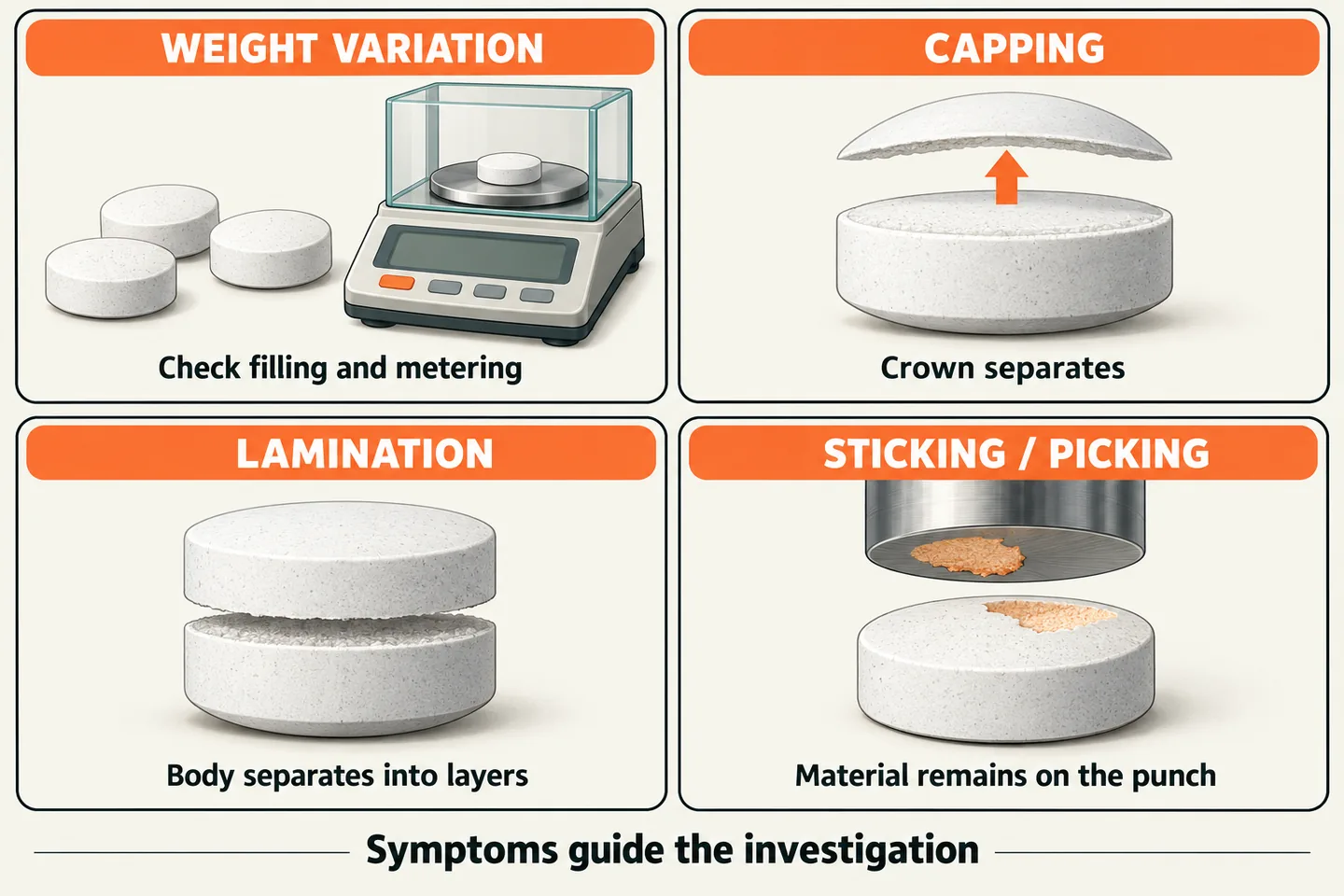
Capping is separation of an upper or lower crown from the tablet body. Lamination is separation into distinct layers. Check whether failure appears during ejection, after handling or during testing. Preserve failed samples so the fracture position can be compared.
Potential contributors include air entrapment, elastic recovery, the loading and unloading profile, die-wall friction and tooling condition. More than one may be present. A tablet press troubleshooting record should therefore include precompression, main compression, speed and any available ejection data.
Precompression can help some blends, but a fixed percentage of main force is not a universal setting. Natoli notes that excessive precompression can also increase capping and that suitable conditions vary by material. Compare controlled settings rather than increasing both forces together without a reference condition. Natoli: preventing capping and other tablet defects.
Inspect punch-tip edges and die condition before blaming the formulation alone. Any proposal to alter punch penetration, die geometry or head configuration needs confirmation against the press and tooling specifications. A successful setting on another machine is a starting point for evaluation, not a transferable production instruction.
5. Trace sticking and picking to the material and punch surface
Sticking involves material adhering to the tooling surface; picking describes localized removal, often around an embossed feature. Record whether buildup appears immediately or increases as the run continues, and whether the same character or punch position is involved.
Inspect for residue, damaged surfaces, unsuitable cleaning residues and changes in the blend. Compare moisture using a defined measurement method and sampling point. A universal target such as 2%–3% is not appropriate for every formulation, and loss on drying is not always equivalent to water content.
Temperature and moisture can interact at the punch–tablet interface. An MCC compaction study examined moisture migration and proposed a contribution to sticking; its findings do not prove the same mechanism for every product. Original research: moisture behavior during tableting.
Separate machine lubrication from formulation lubrication. Wiping an unapproved powder or lubricant onto a punch face can affect the product and obscure the investigation. For tablet press troubleshooting, review surface condition and formulation options through the approved process. The tablet sticking and lubricant guide provides related questions for that review.
6. Treat discoloration and contamination as separate questions
For tablet press troubleshooting, distinguish mottling from oil spots and foreign-colored particles: they can look similar but need different investigations. Check retained material, intermediate samples, tablet surfaces and the condition of the compression area. Note whether the pattern appears throughout the batch or only after a particular event.
| Observation | Check before assigning a cause | Next decision |
|---|---|---|
| Oily or smeared mark | Leaks, lubricant migration and punch seals | Assess affected material and repair the identified source |
| Color differs across otherwise clean tablets | Blend uniformity, colorant distribution and granulation history | Review the formulation and process evidence |
| Unexpected colored particles after changeover | Cleaning records and residues from the previous product | Escalate possible cross-contamination for quality review |
| Marks begin after a service task | Cleaning agents, replaced parts and assembly records | Confirm cleanliness and compatibility before release |
Keep potentially affected output identified while the cause and product disposition are assessed. Do not assume that adjusting room humidity or remixing the batch resolves contamination. Rework requires its own approved decision. Cleaning and inspection are distinct parts of tooling care, as reflected in Natoli’s maintenance resources. Natoli: cleaning and inspection resources.
7. Stop and investigate retained tablets or double compression
An unintended retained tablet may be compressed again if it remains at a punch or die position as the cycle continues. This differs from an intentionally designed multilayer tablet process. Treat suspected retention, unusual impact or a repeated thick tablet as a reason to stop for investigation.
After the appropriate isolation, a trained technician can inspect ejection and take-off components, punch movement, tooling condition and any sticking at the implicated station. Use the model-specific procedure to verify ejection height and component clearances. Do not reach into the press or repeatedly jog it to force a jam through.
For tablet press troubleshooting after an ejection incident, account for damaged tooling and any fragments, identify affected product and document the repair. Restart only after the relevant mechanical, guarding and product checks are complete. Simply removing the visible tablet does not establish that the underlying fault has been corrected.
8. Investigate abnormal noise, heat, leaks and powder escape
A new scraping sound, impact, rising temperature or powder leak deserves a comparison with the machine’s normal condition. Record when it occurs and the associated settings, then inspect at the required safe state. Do not continue increasing force or lubrication to see whether a mechanical symptom disappears.
| Assembly | Possible inspection points | Important boundary |
|---|---|---|
| Turret, die pockets and punch guides | Wear, runout, die retention and punch travel | Lubricant cannot restore lost alignment or dimensions |
| Cam tracks and transitions | Wear, loose components and damaged contact surfaces | Grinding or stoning requires an approved repair method and inspection |
| Compression rollers and bearings | Surface damage, condition and specified lubrication | Confirm component limits and replace damaged parts as required |
| Feeder and scraper | Seating, wear, clearance and powder accumulation | Use specified clearances; avoid improvised machining |
| Drive and gearbox | Model-specific belt/drive condition, seals and oil level | Use the specified oil and repair method; a thicker oil is not a diagnosis |
| Filling and adjustment mechanisms | Backlash, worn connections and unstable movement | Verify adjustment and measurement after repair |
Natoli Scientific lists die-table runout, punch guides, cams, pressure rolls and die pockets among preventive-maintenance inspection points. This supports a measured mechanical assessment rather than assuming every fault results from insufficient oil. Natoli Scientific: calibration and preventive maintenance.
For lubrication, confirm the point, product, quantity and application method in the maintenance instructions. Natoli distinguishes punch-barrel and punch-head lubrication in its guidance. Keep incompatible products and excess lubricant away from product-contact areas. Natoli: lubrication of punches and presses. A tablet press troubleshooting log should record the lubricant actually used, not simply “oiled machine.”
9. Build maintenance around use, condition and verified changeovers
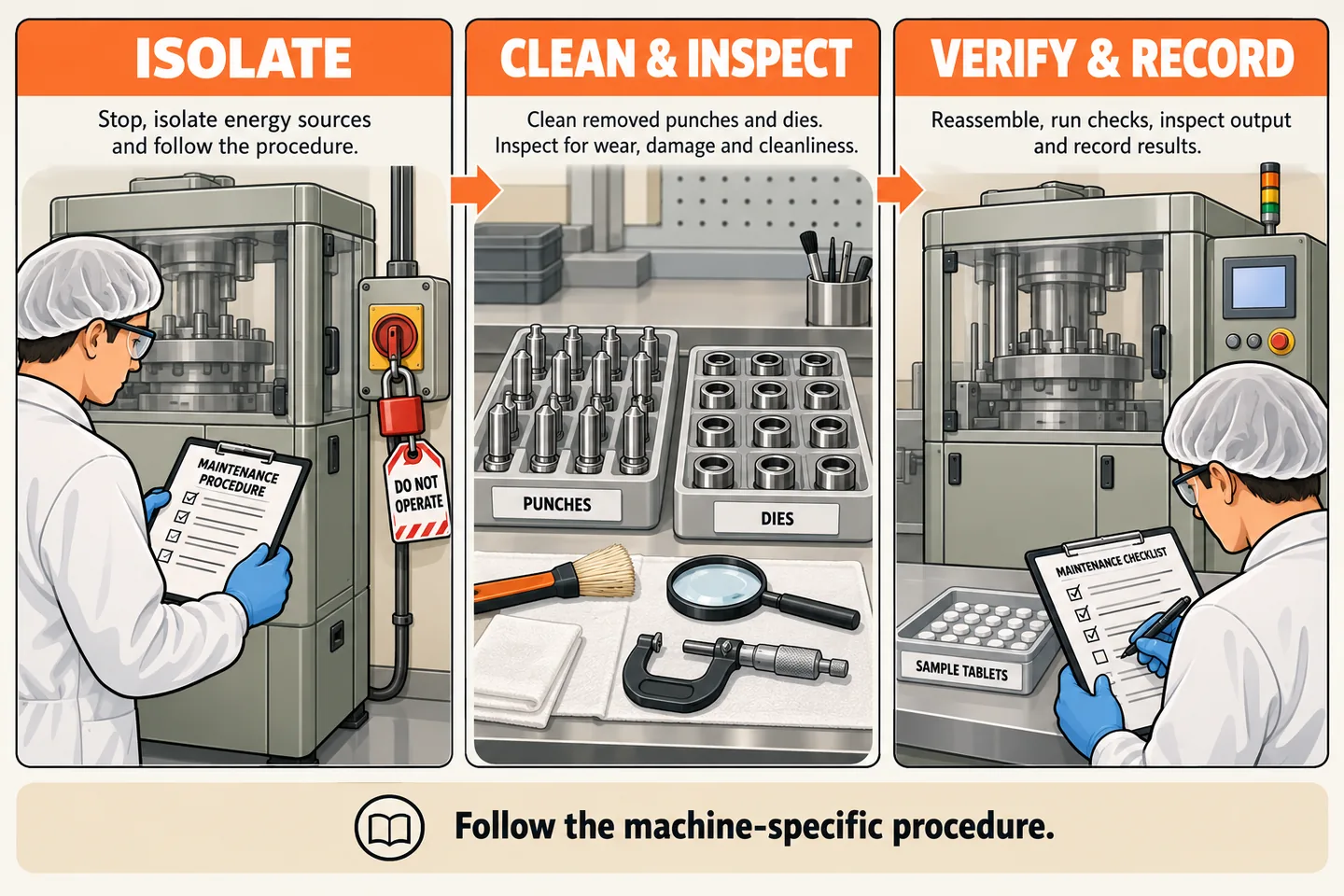
Use tablet press troubleshooting records to shape a preventive plan. Combine manufacturer intervals with operating hours, material abrasiveness, powder buildup, cleaning requirements and fault history. The schedule below is a planning template, not a universal service frequency. Assign a responsible person and a record for each task.
| Trigger | Suggested scope to define in the site procedure | Record to retain |
|---|---|---|
| Before startup or after changeover | Cleanliness, correct tooling, guarding, lubrication status and setup checks | Signed setup and release checklist |
| During a run, at planned observation points | Mass/force trends, visible buildup, alarms and normal operating behavior | Time-stamped process and inspection log |
| End of a run or scheduled cleaning | Controlled residue removal, inspection, drying and approved protection | Cleaning record and defects found |
| At specified hours or calendar intervals | Wear measurements, lubrication service and instrument verification | Maintenance and calibration/verification records |
| After damage, major repair or long storage | Reinspection, setup confirmation and an appropriate restart trial | Repair report and restart acceptance results |
Cleaning frequency should respond to the process. A fixed “once per shift” rule may be inadequate for one material and unnecessary for another. Use a suitable, approved residue-removal method; do not disperse powder through the machine with an improvised compressed-air cleanup. Confirm that cleaning agents and drying methods suit the tooling, seals and contact materials.
Tooling changeover needs the same discipline. Match the set and machine specifications, inspect clean seating surfaces, confirm shaped-tool alignment and use the specified installation tools. Die seating, retention torque, punch dimensions and clearances are machine-specific. Generic hammering instructions or a copied 0.05 mm tolerance should not replace the approved drawing and procedure.
I Holland’s maintenance framework includes cleaning, assessment, appropriate repair, measurement, polishing, lubrication and storage. Measurement after repair matters because a visually improved surface may still be dimensionally unsuitable. Apply any repair or polishing method only where appropriate for the tool and coating. I Holland: tooling maintenance and storage framework. Our tablet tooling maintenance guide expands on these checks.
Store clean, dry tooling with approved corrosion protection, individual protection against impacts and clear set identification. Oil immersion is not a universal storage requirement. Identify spare parts by machine model, serial number, drawing and revision, then prioritize stock using failure history and lead time. Keep serviceable and rejected parts distinguishable.
Close each tablet press troubleshooting record with the confirmed finding, action, measurements and restart result. Include material and environmental conditions when sharing records between countries or production sites. This makes it easier to compare similar faults across sites.
For an equipment discussion, review the ZPW29 / ZPW31 rotary press and rotary press tooling information, then send the machine identification and process brief. Confirm actual configuration, parts compatibility and documented limits before selecting a replacement or planning an upgrade.
Tablet press troubleshooting FAQ
Why does tablet weight vary on a high-speed press?
Possible contributors include inconsistent feed, segregation, metering settings, feeder installation and tooling or guide condition. Verify the balance and actual tablet masses first, then compare the trend with the process record. A force-control signal is an indirect indication, not a separate weighing result.
Should I increase pressure when tablets are weak?
Only as a controlled trial within documented limits, after checking mass and other likely contributors. Evaluate strength together with friability, defects and required product tests. More compression can be ineffective or worsen defects in some conditions.
Can thicker oil correct punch and die misalignment?
No. Lubrication may reduce friction, but it cannot restore worn dimensions or alignment. Have the guides, die pockets, turret condition and tooling measured and corrected using the specified service method.
How often should a rotary tablet press be cleaned?
Use the established cleaning procedure and machine guidance, adjusted through a documented assessment of product, buildup and operating history. Routine observation, changeover cleaning and scheduled maintenance are different activities and need defined responsibilities.
What information helps a supplier investigate a fault?
Provide the model and serial number, tooling identification, defect photographs, material description, relevant settings and alarm history. Add when the fault occurs, whether it follows a station, and what changed before it began. Share recorded observations rather than an assumed diagnosis.
Technical sources and scope
The references support the mechanisms and maintenance principles discussed here. They do not establish a validated operating procedure for another machine. The investigation tables are editorial planning aids; verify all adjustments and acceptance criteria against the actual product and equipment.
- OSHA: control of hazardous energy during servicing
- KORSCH: press-force control and multi-tip tooling
- KORSCH / MEDELPHARM: investigating tablet defects
- Natoli: preventing capping and other tablet defects
- Original research: moisture behavior during tableting
- Natoli: lubrication of punches and presses
- Natoli Scientific: calibration and preventive maintenance
- I Holland: tooling maintenance and storage framework
- Natoli: cleaning and inspection resources